
PPM Express reads your Azure DevOps projects, epics and features into one enterprise portfolio, with budgets, benefits, timelines and real capacity attached. Your teams keep their boards, their sprints and their Program Increments. Leadership stops waiting for a deck.
One of the largest law firms in the US runs 7 IT portfolios and over 200 projects this way — 2,000+ attorneys, 14 offices, every initiative delivered in Azure DevOps.


Boards roll up to a team. They do not roll up to a program, a portfolio or a budget line. The people deciding what to fund next quarter are reading a view designed for the people delivering this sprint.
Someone exports epics, pastes them into a deck, colours the statuses and writes the narrative. It takes days, it is stale on arrival, and engineering time pays for it.
An increment is planned against backlog size rather than against people who are already committed to two other programs. The collision shows up in delivery, not in planning.
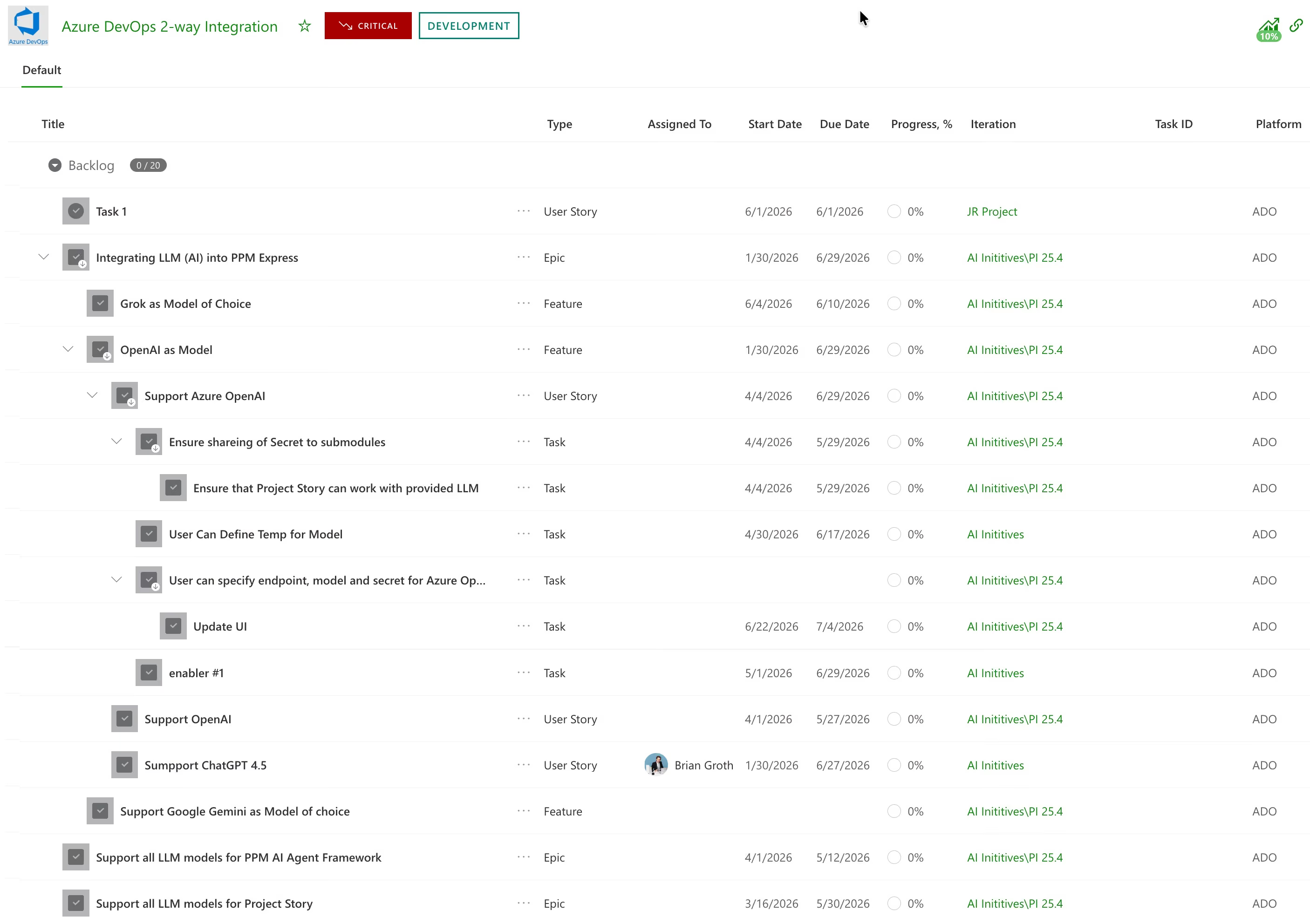
PPM Express connects to Azure DevOps work-tracking data only — epics, features, user stories, tasks, dates, effort, progress, iterations.
Project in PPM Express can be mapped to any set of work items in DevOps - one or multiple workitems or entire PI or sprint.
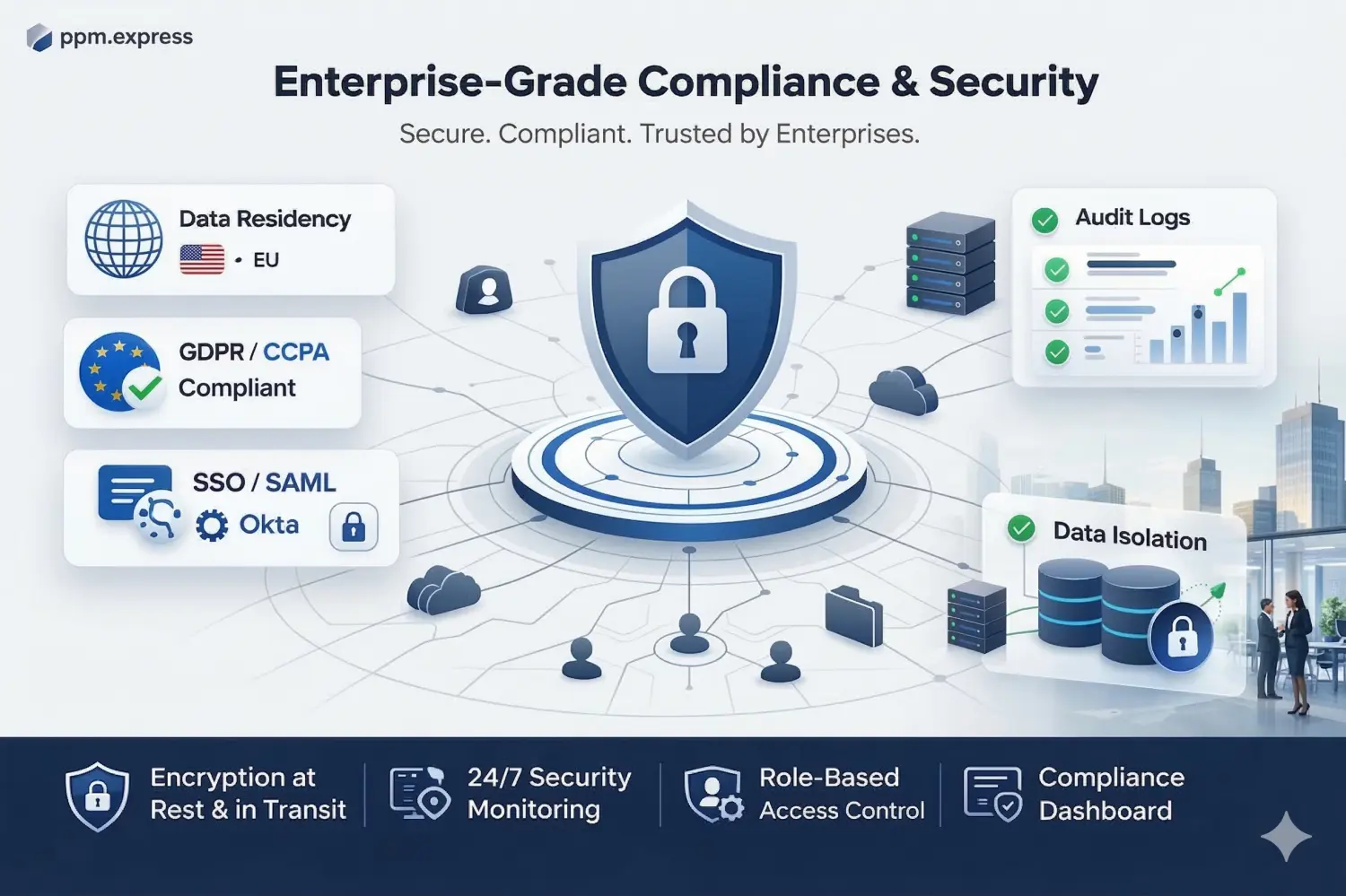
There is no connection to repositories, no access to pipelines and no access to source code, which tends to shorten the security review considerably. Identity runs through Microsoft 365 or Okta SSO, so nobody manages another credential.
The Azure DevOps cloud service. Azure DevOps Server, the self-hosted product, is not supported — better established now than during implementation.
Repositories, pipelines and source code. The longest part of most Azure DevOps security reviews simply does not apply.
Microsoft 365 or Okta SSO, with centralized user management and advanced permissions.
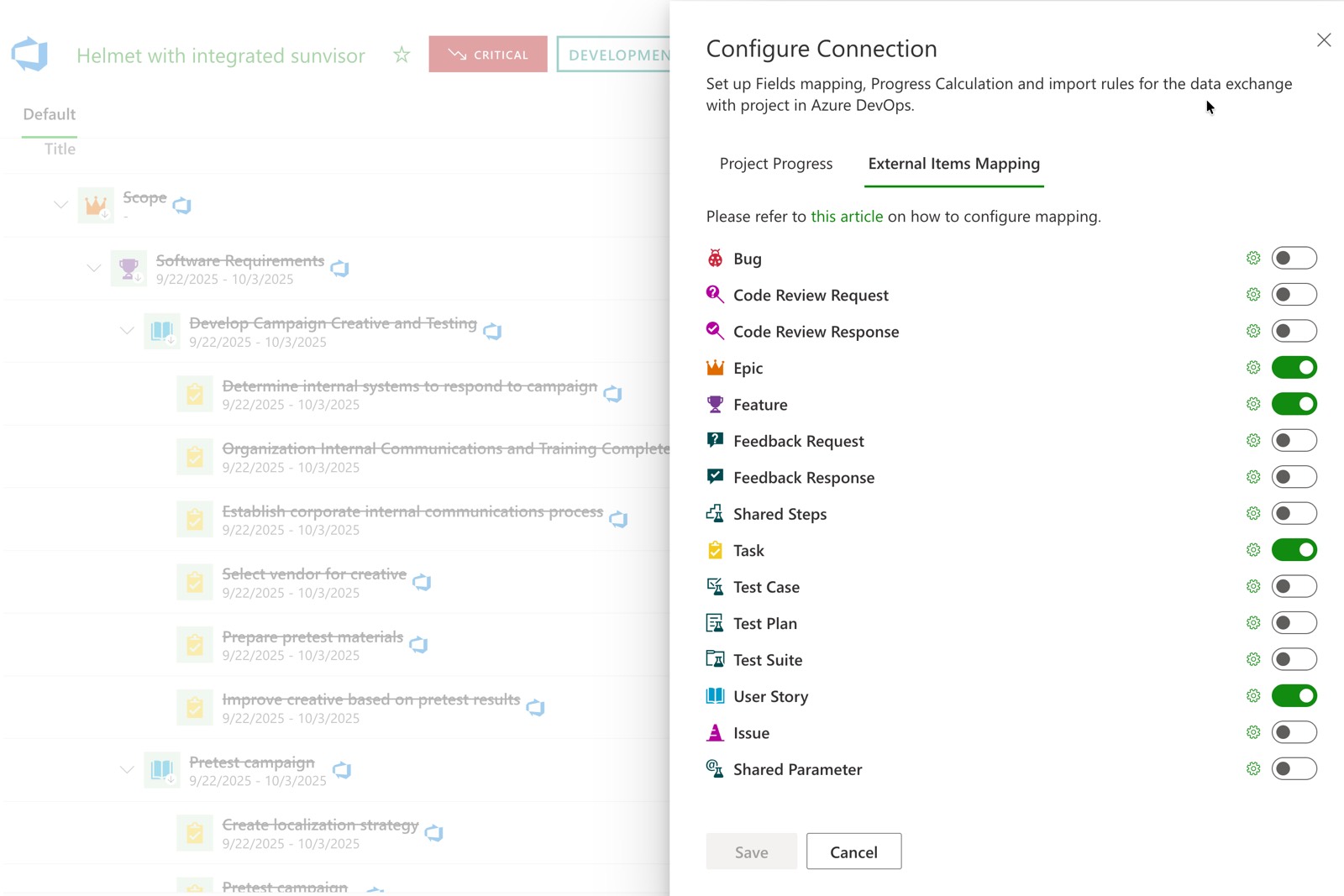
Run the connection one-way, with Azure DevOps feeding the portfolio, or two-way, so agreed changes flow back to the boards. Decide per connection which system owns which field, and keep the boards authoritative where they should be.
Group Azure DevOps projects into the structure leadership actually manages — portfolios, programs, initiatives — and attach what boards do not hold: budget, forecast, benefits, strategic score and risk.
Test a proposed increment against calculated capacity, drawn from each person’s work week and calendar exceptions. Publish the decision, and let it reach the teams instead of stopping at the steering committee.
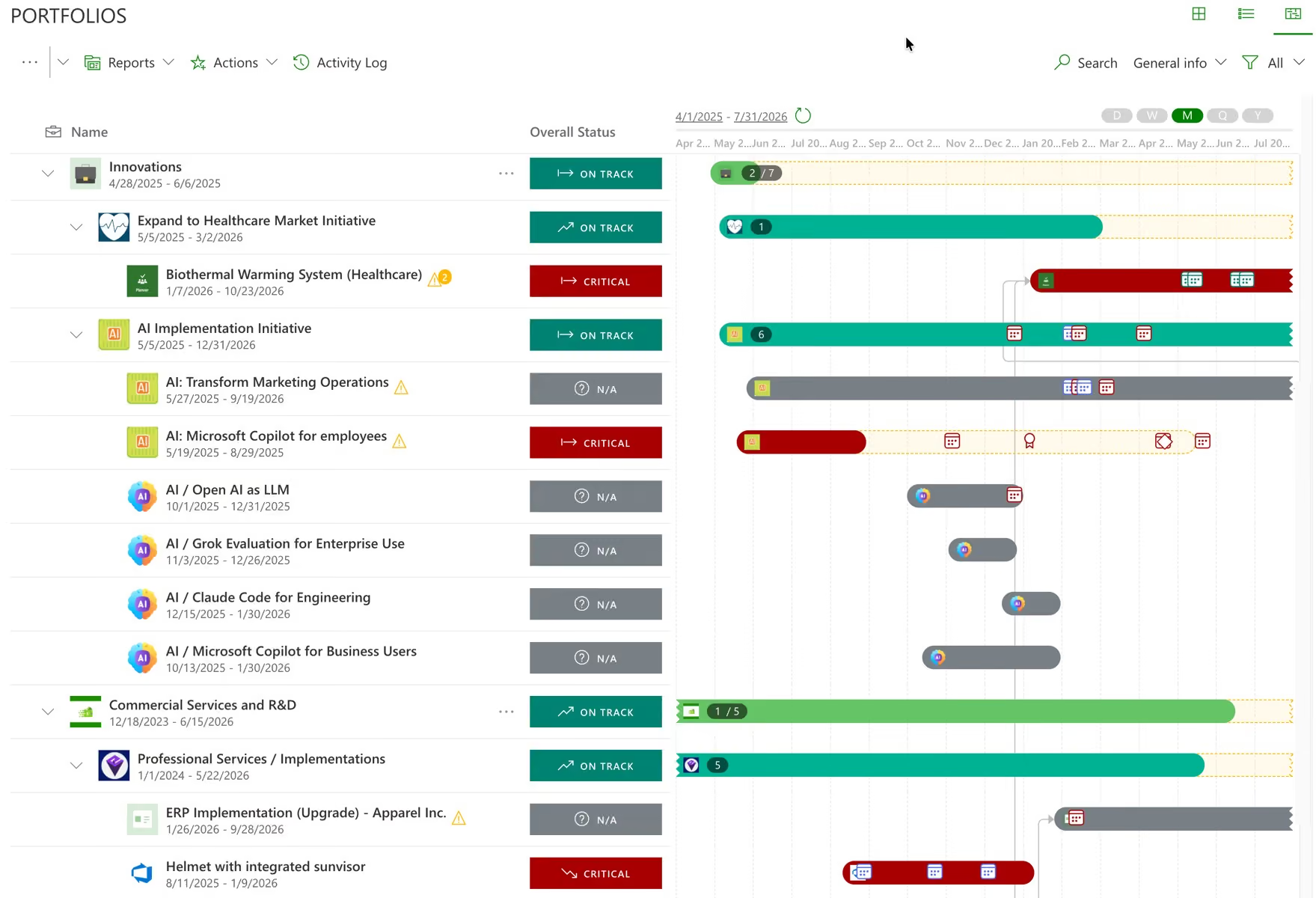
Azure DevOps projects become portfolios and programs with the structure your organization is actually run by.
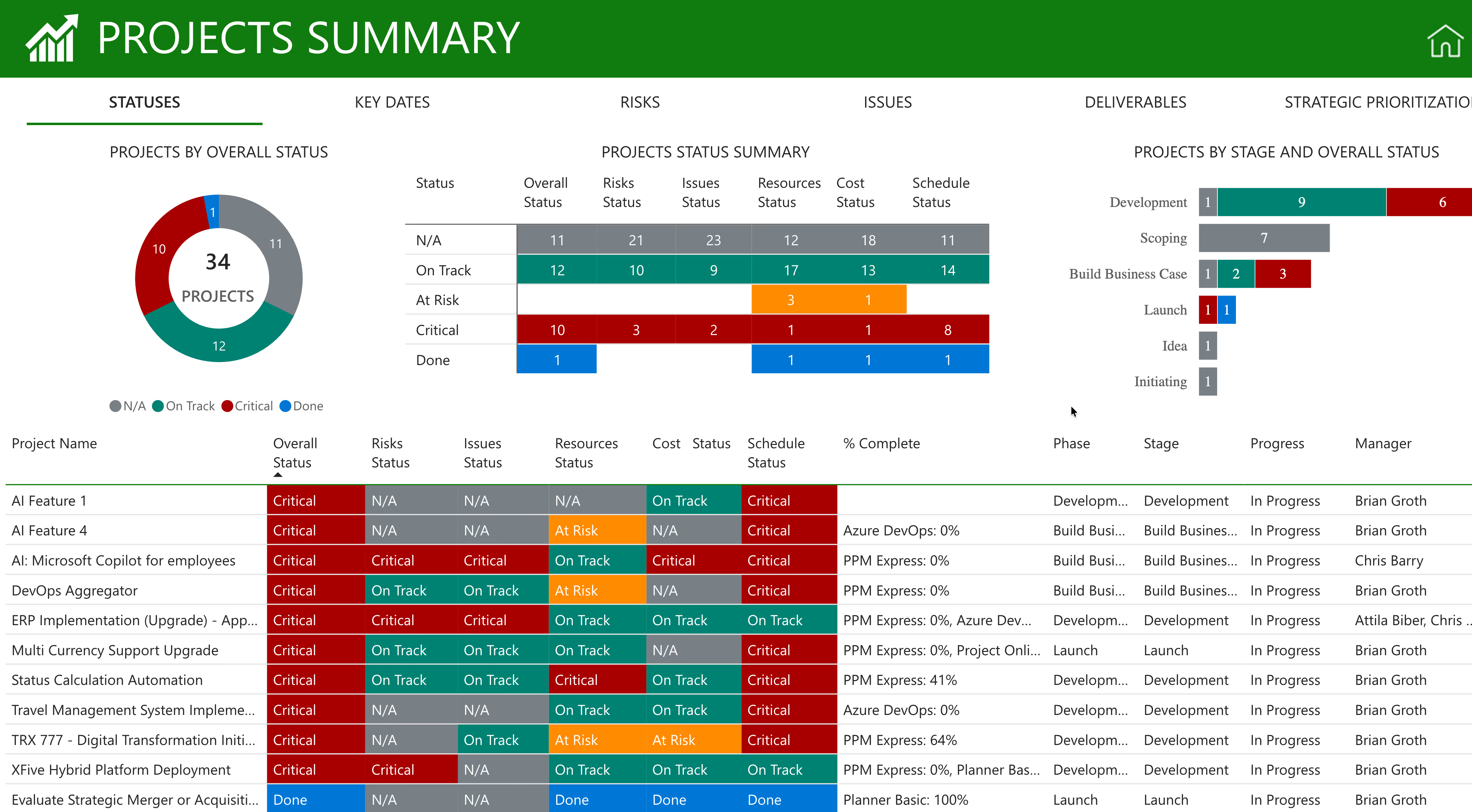
Every program carries its status, timeline, budget, capacity and risk in the same row, so a portfolio review reads as one table rather than eleven browser tabs.
Portfolios, programs and initiatives above the Azure DevOps projects your teams deliver in.
Status, dates, budget, forecast, benefits, capacity and risk, comparable across every program in the portfolio.
Read-only status access for stakeholders, so the portfolio is something they look at rather than something you send them.
Project portfolio management asks whether the work in Azure DevOps is on track. Strategic portfolio management asks whether it is the right work — funded at the right level, against the right objectives, and worth what it cost. Azure DevOps answers neither at portfolio level, because it was never built to. PPM Express adds both layers above the boards your teams already deliver in. How strategic portfolio management works.
Azure DevOps projects sit under the strategic objective and the funding bucket they were approved against — run-the-business, growth, compliance, technical debt — so an engineering program competes inside its class rather than against everything at once.
Initiatives are ranked on weighted criteria you configure yourself, so the decision to fund the next increment can be explained line by line to a finance partner who has never opened a board.
The business case stays attached to the initiative after the work closes in Azure DevOps, so the next funding round argues from measured return rather than from the last deck anyone happened to build.
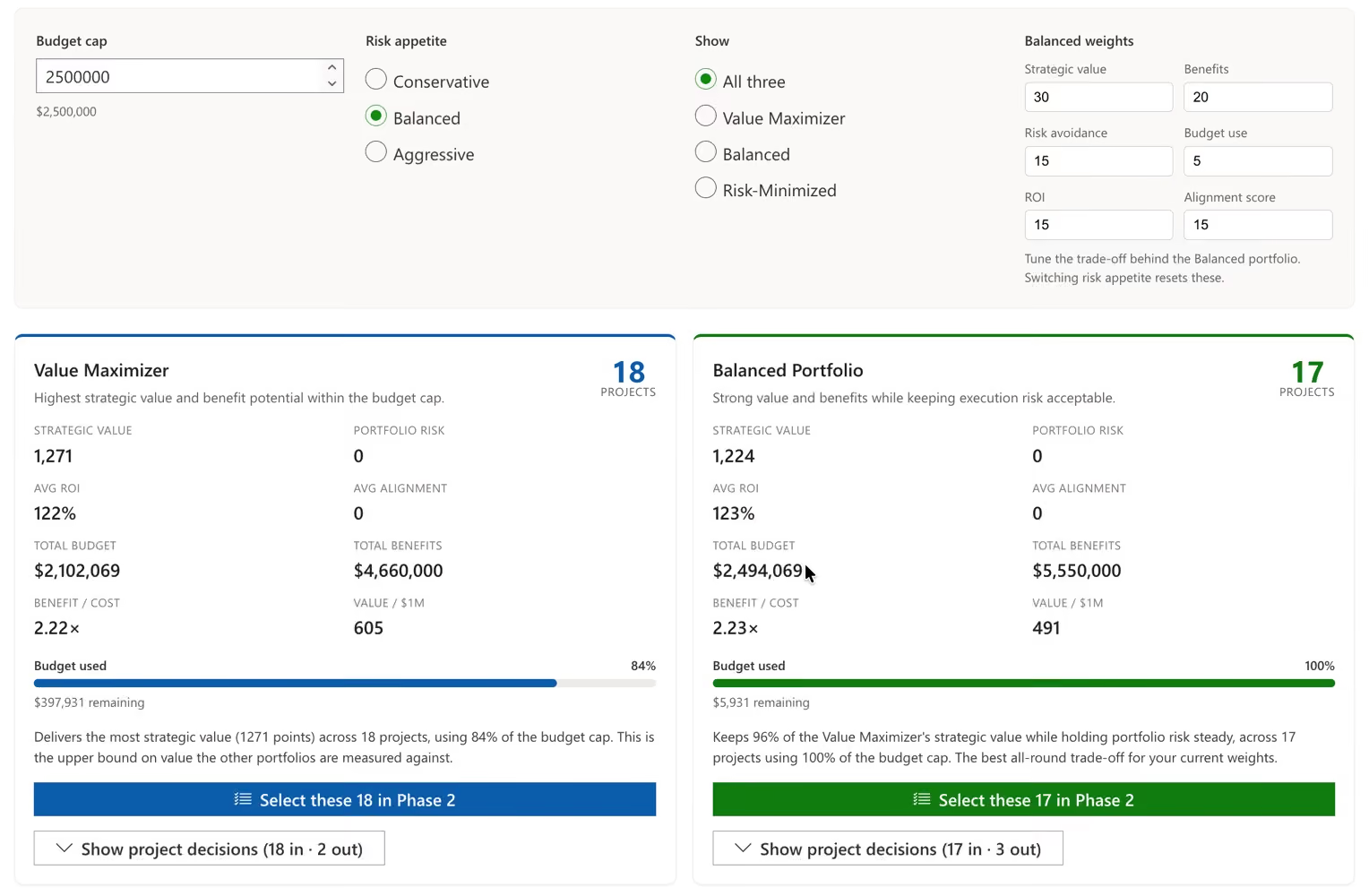
Progress is read from the epics and features your teams are already updating: state, percent complete, dates and owner. Nobody exports anything, and the portfolio cannot drift from the boards because it is not a copy of them.
The roll-up reflects board activity rather than the moment somebody last built a spreadsheet.
If numbers change upstream after you have built an analysis, PPM Express shows exactly what changed and asks whether to take it, instead of absorbing it silently.
AI-written summaries drawn from live delivery data, so program managers stop writing updates about work the system can already see.
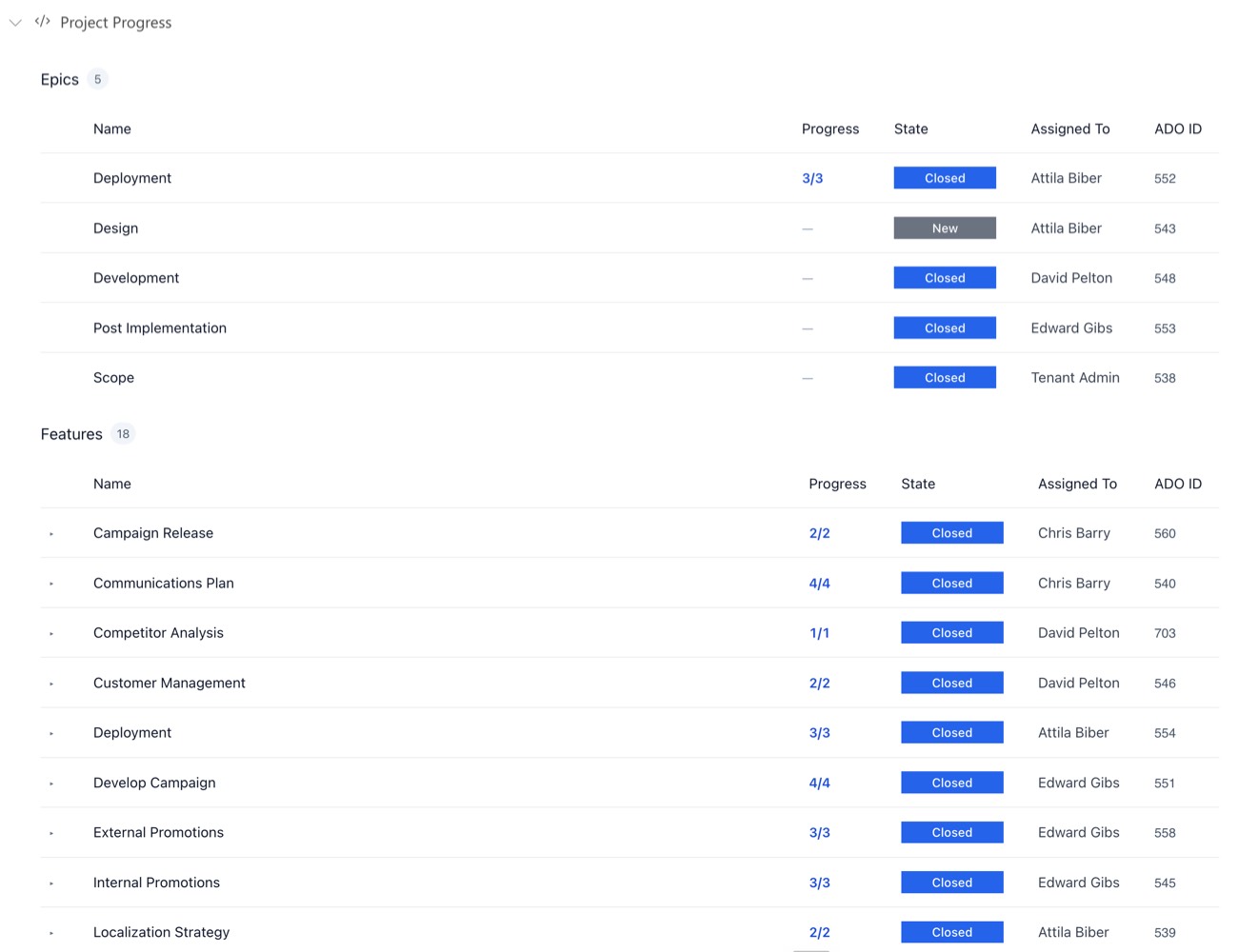
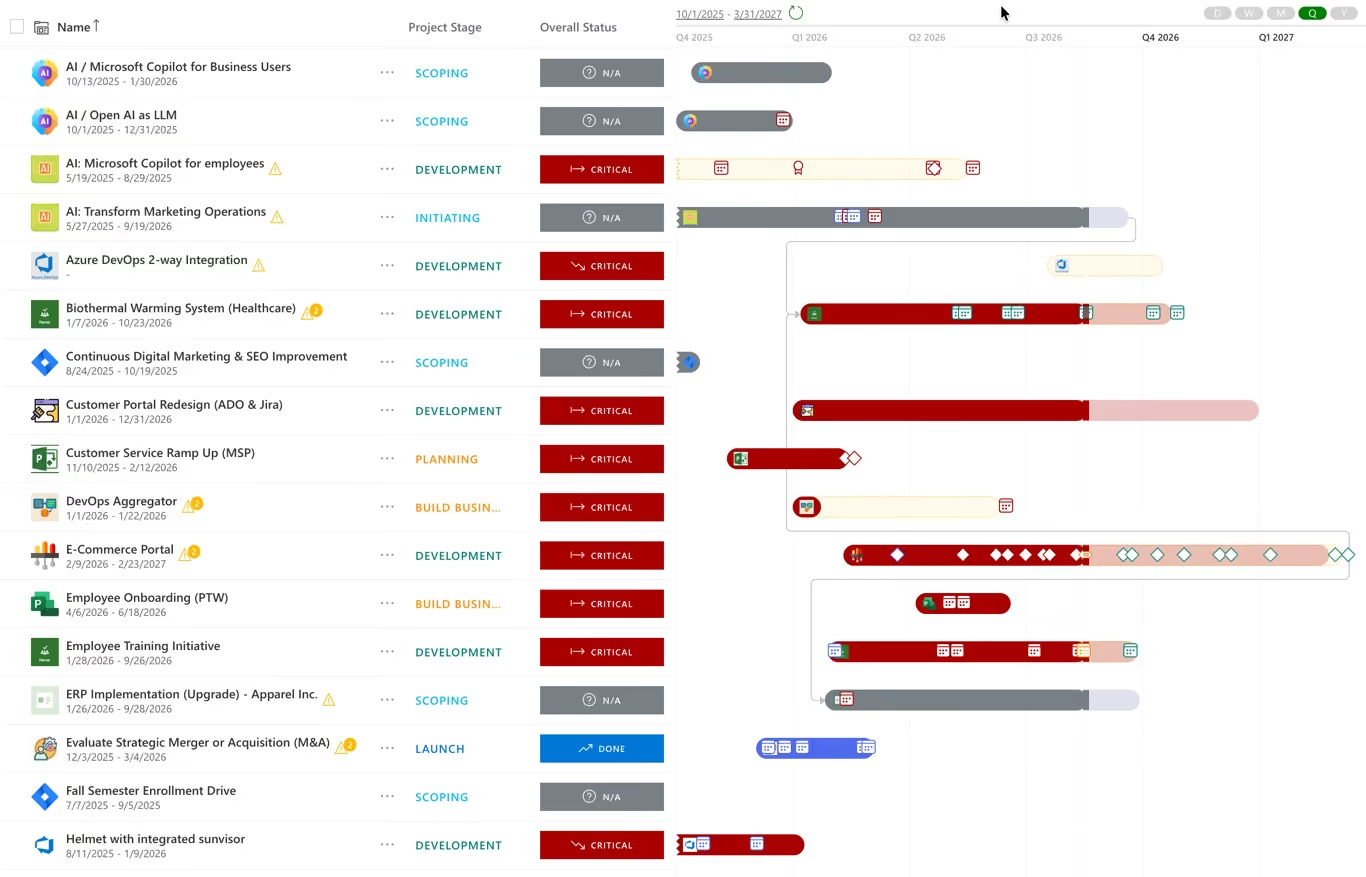
One Gantt across projects, epics and features, with dependencies and milestones on it. Program Increment backlogs, sprints, effort and cost sit in the same picture, so the roadmap and the boards cannot tell two different stories.
Projects, epics and features on a single Gantt with dependencies drawn between them.
Every milestone, owner and due date in one view — updated once, reflected everywhere.
Built from live delivery data, so when the work moves the roadmap moves with it rather than needing to be redrawn.
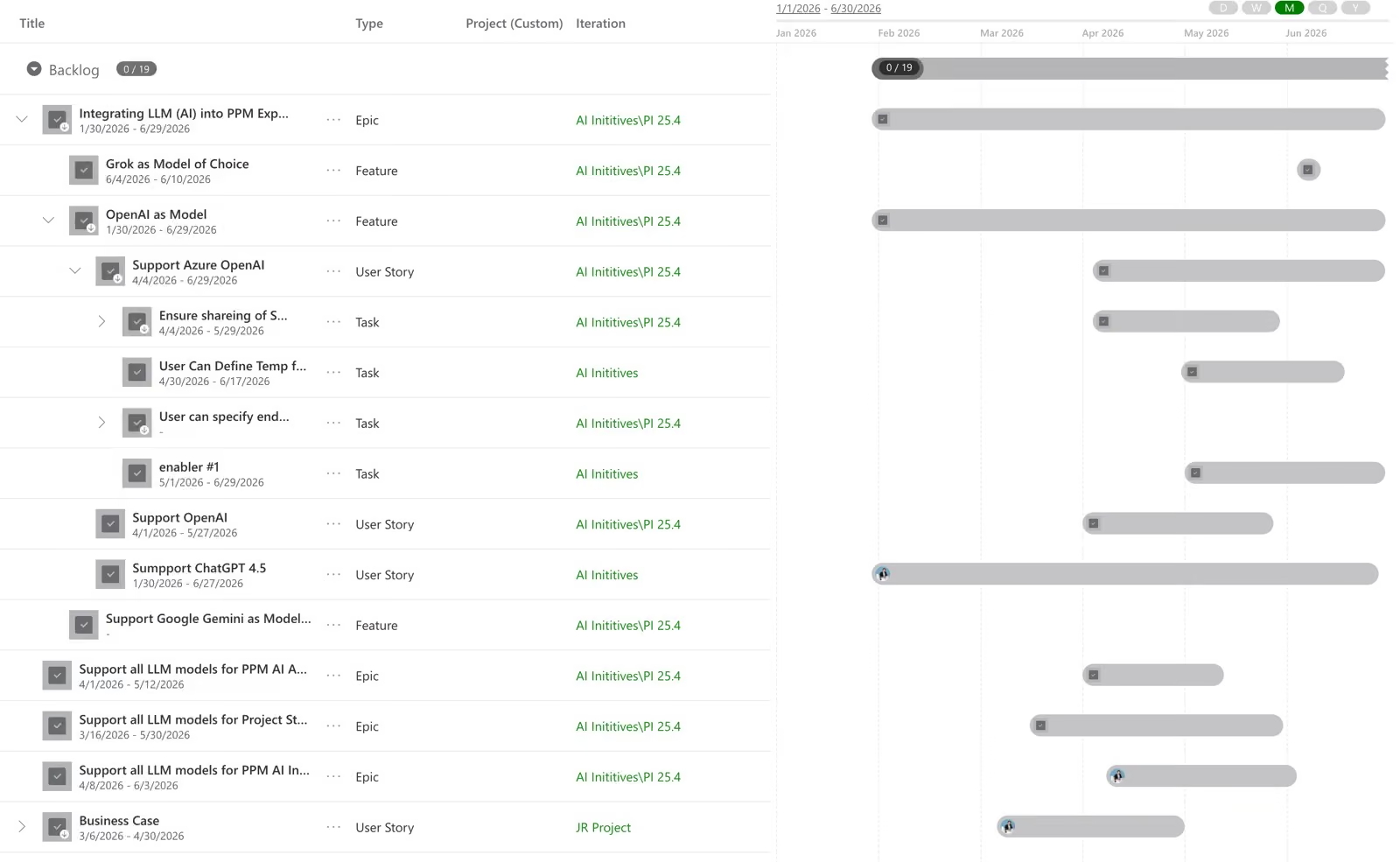
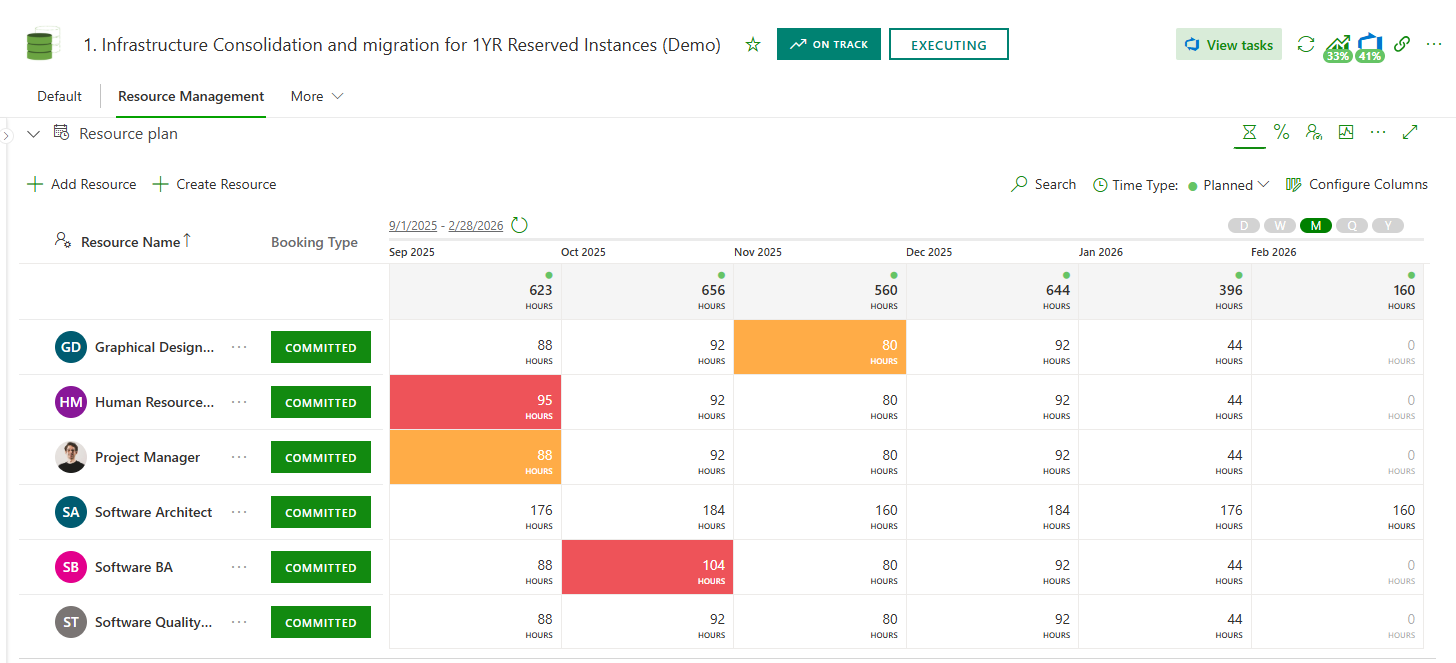
The constraint in an Azure DevOps estate is almost never backlog size — it is the same specialists appearing in three plans. Allocate people to epics and initiatives in hours or percentage FTE, read the pool as a table or a histogram, and find the collision while the increment is still a proposal.
Allocate resources on Azure DevOps epics and initiatives across projects in one pass.
Calculated from each person’s work week, calendar and calendar exceptions, not from an assumed eight-hour day.
“When will it ship” becomes “here is what would have to move for it to ship then”.
Azure DevOps work is reported next to everything else the enterprise delivers. If parts of the organization run Jira, Microsoft Project, Microsoft Planner, Smartsheet or Monday.com, those roll into the same portfolio and the same reports — no team migrates, and nobody maintains a sync layer between trackers purely to produce a leadership report.
Portfolio and project health, risks, issues, costs and capacity, ready to use rather than ready to build.
Azure DevOps alongside Jira, Microsoft Project, Planner, Smartsheet and Monday.com.
For executives, customers and external stakeholders — the same numbers, without a rebuild per audience.
Most portfolio tools give you one integration and expect the estate to fit it. Azure DevOps connections in PPM Express are configured one at a time, so a division that wants the portfolio to stay read-only and a division that wants decisions to reach the boards can both be right — and in two-way mode you decide which fields move and which way they go.
Azure DevOps projects, epics and features are read into the portfolio and nothing is written back. Choose it when the boards are the single source of truth for delivery and you want the portfolio layer to observe rather than intervene. It is also the shortest path through a security review.
If you need two-way sync, It is available in PPM Express Ultra Plan.
Any set of fields can sync, configured per connection. Choose it when decisions taken at portfolio level need to reach the backlog, or when projects start on leadership level, timelines build, and structure of Epics andf Features need to be pushed to the Azure DevOps
When the same field has changed on both sides, PPM Express shows you the conflict and asks which value wins — pull the board’s value, or push the portfolio’s. Nothing is overwritten quietly.
Work-tracking data: epics, features, dates and progress. No repositories, no pipelines and no source code. The Azure DevOps cloud service is supported; Azure DevOps Server, the self-hosted product, is not.

One of the largest law firms in the United States — over 2,000 attorneys across 14 offices worldwide — manages all of its IT initiatives in Microsoft Azure DevOps, and runs the portfolio in PPM Express.
Their leadership team does not read a status deck. They work from the dependencies between initiatives, actual progress, timelines and milestones, with reporting generated automatically across all seven portfolios and their programs. Everything described on this page is running in that estate today.
Not only what each program is doing, but what it is waiting on — visible before it becomes a delay.
Read from the boards the teams are already updating, across every connected Azure DevOps project.
Automated across portfolios and programs, so leadership reviews the portfolio instead of commissioning a view of it.
Leadership cannot view portfolios and program status and progress directly. The monthly reporting is manual and time consuming.
Epics and features planned manually and need to be manually created / updated in Azure DevOps
Engineering leadership need to constantly export and format the data for leadership.
Leadership reads the portfolio directly. The monthly rebuild — and the engineering time inside it — disappears.
The conversation moves from backlog size to who is genuinely free, and the specialist collision is found in planning rather than in delivery.
The only people who need an account are the ones asking portfolio questions: engineering leadership, the PMO, finance partners.
PPM for Azure DevOps, answered.
Running a portfolio whose delivery data sits in Azure DevOps. Boards track execution well; what they do not hold is money, benefit, strategic value or organization-wide capacity. Project portfolio management supplies the first layer — status, dates, cost, capacity across every connected project. Strategic portfolio management supplies the second — objectives, investment categories, scored business cases and benefits realisation — so leadership can decide what to fund and sequence rather than only observe what is in flight.
Both are offered, and it is set per connection. One-way reads Azure DevOps projects, epics and features into PPM Express and writes nothing back. Two-way syncs the fields you map, in the direction you choose — any set of fields, not a fixed list — so the portfolio reflects board activity and agreed changes reach the teams.
You do. Two-way connections are configured with a field mapping: you choose which fields are included and which direction each one moves. That means the system that should own a field keeps owning it, rather than the integration imposing a model on your estate.
It is surfaced as a conflict for a person to resolve — you review it and decide whether to pull the Azure DevOps value or push the PPM Express one. Nothing is overwritten silently, which matters when a date on a board and a date in a portfolio disagree for a reason.
Azure DevOps cloud is supported. Azure DevOps Server, the self-hosted product, is not. If part of your estate still runs Server, that portion cannot be connected directly, and it is better to establish this early than to discover it during implementation.
Work-tracking data: epics, features, dates and progress. There is no connection to repositories and no access to pipelines or source code, which tends to shorten the security review considerably. Identity runs through Microsoft 365 or Okta SSO.
Yes, and it is a common reason enterprises adopt PPM Express. Both are supported connections and work from each rolls into one portfolio, alongside Microsoft Project, Microsoft Planner, Smartsheet and Monday.com. Neither group of teams migrates, and nobody maintains a sync layer between trackers purely to produce a leadership report.
No. Engineering keeps its boards, its sprints and its Program Increments, and PPM Express reads from them. The only people who need an account are the ones asking portfolio questions. A portfolio tool that makes delivery teams maintain a second set of records is a portfolio tool holding stale data by the end of the quarter.
Test it against capacity before it is committed. PPM Express calculates availability from each person’s work week and calendar exceptions, allocates people to epics and initiatives in hours or percentage FTE, and flags overallocation while the increment is still a proposal.
Yes. One of the largest law firms in the United States — over 2,000 attorneys across 14 offices worldwide — runs 7 IT portfolios and more than 200 projects in PPM Express, with every initiative delivered in Azure DevOps. Their leadership team works from initiative dependencies, actual progress and milestones, with reporting automated across all seven portfolios.
Both, and enterprises increasingly need the two together. Project portfolio management asks whether the work in Azure DevOps is on schedule, on budget and properly staffed. Strategic portfolio management governs the decision behind it — which objective the initiative serves, which funding bucket it draws from, how it scored against the alternatives, and whether the benefit was realised after release. PPM Express covers both layers over the same Azure DevOps data, so you are not choosing between execution visibility and investment governance.
Delivery split between Azure DevOps and Jira? Both roll into one portfolio. Jira portfolio management
Capacity calculated from real work weeks, before an increment is committed. Resource capacity planning and utilization
What leadership sees when every delivery tool reports into one portfolio. One live portfolio across every tool
Every system PPM Express connects to, and what each connection reads. All PPM Express integrations
Hosting, identity, permissions, and the data PPM Express never touches. Security and trust

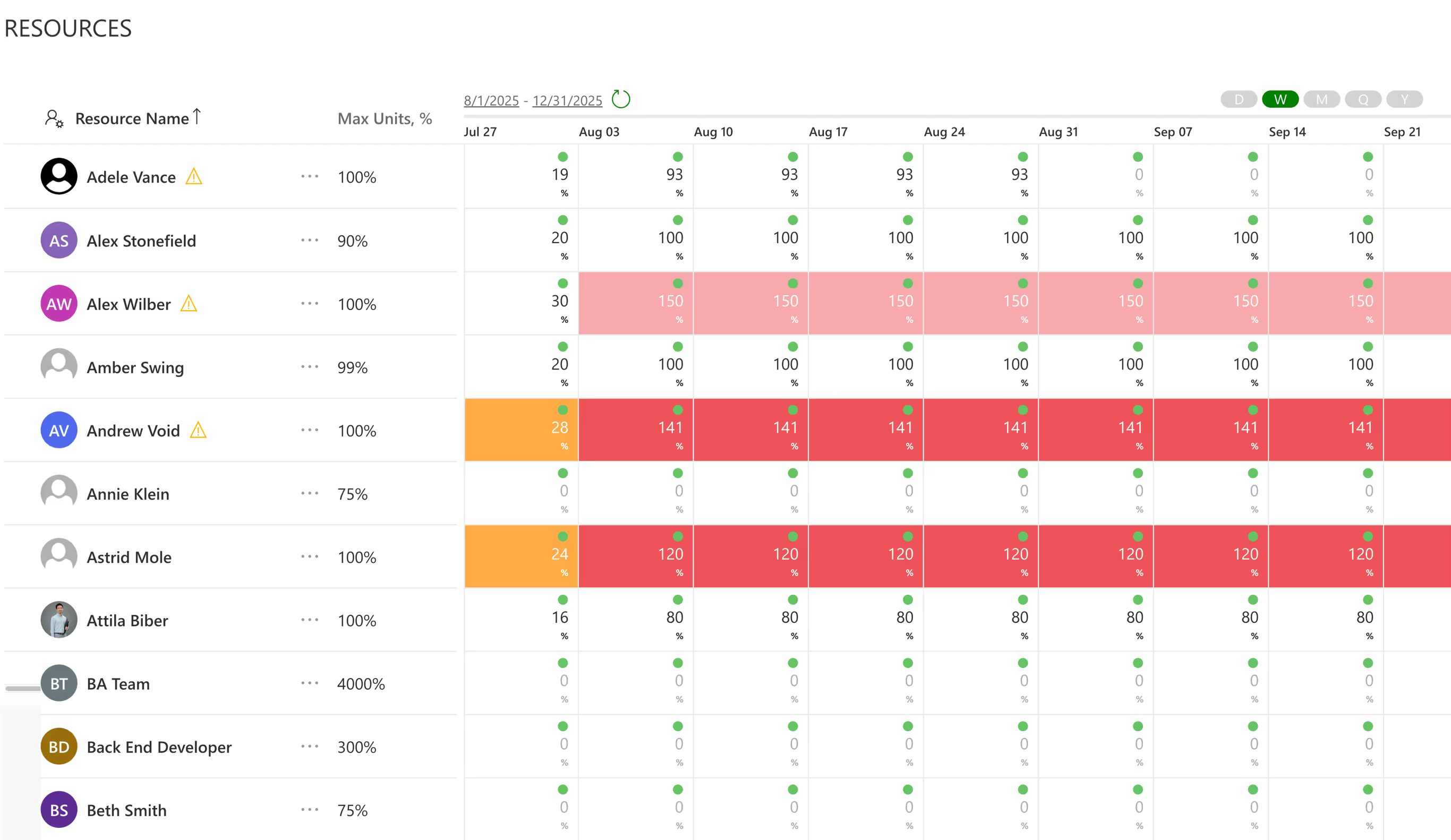
Weighted Prioritization Model for selecting right investment
Integrations

Capacity from real work weeks, so over-allocation surfaces before you commit.
Product

Structured Approach for prioritizing and aligning portfolios with strategic priorities and resource constraints
Product
Last updated 20 August 2026




.svg)


