
Teams love monday.com because they can shape it to the way they already work. That is exactly why no two boards are comparable, and why nothing above the board level — programs, capacity, cost, benefit, risk — has anywhere to live. PPM Express reads your boards into one enterprise portfolio and leaves every team to work the way it chose.
No migration, no board rebuild, no extra seats for people who only want to read — and no lock-in: monday.com sits alongside Jira, Azure DevOps, Microsoft Project, Planner and Smartsheet in the same portfolio.


Each team invents its own columns, statuses and rules. Thirty boards produce thirty answers and never one portfolio, because there is no shared definition to roll them up against.
Executives, sponsors and finance partners only ever read. Giving each of them a paid seat to view boards they will never edit is how a work management bill quietly becomes a portfolio-sized one.
A board shows who an item is assigned to, not whether that person has any time. There is no budget against a benefit, and no register where a risk gets an owner and a date.
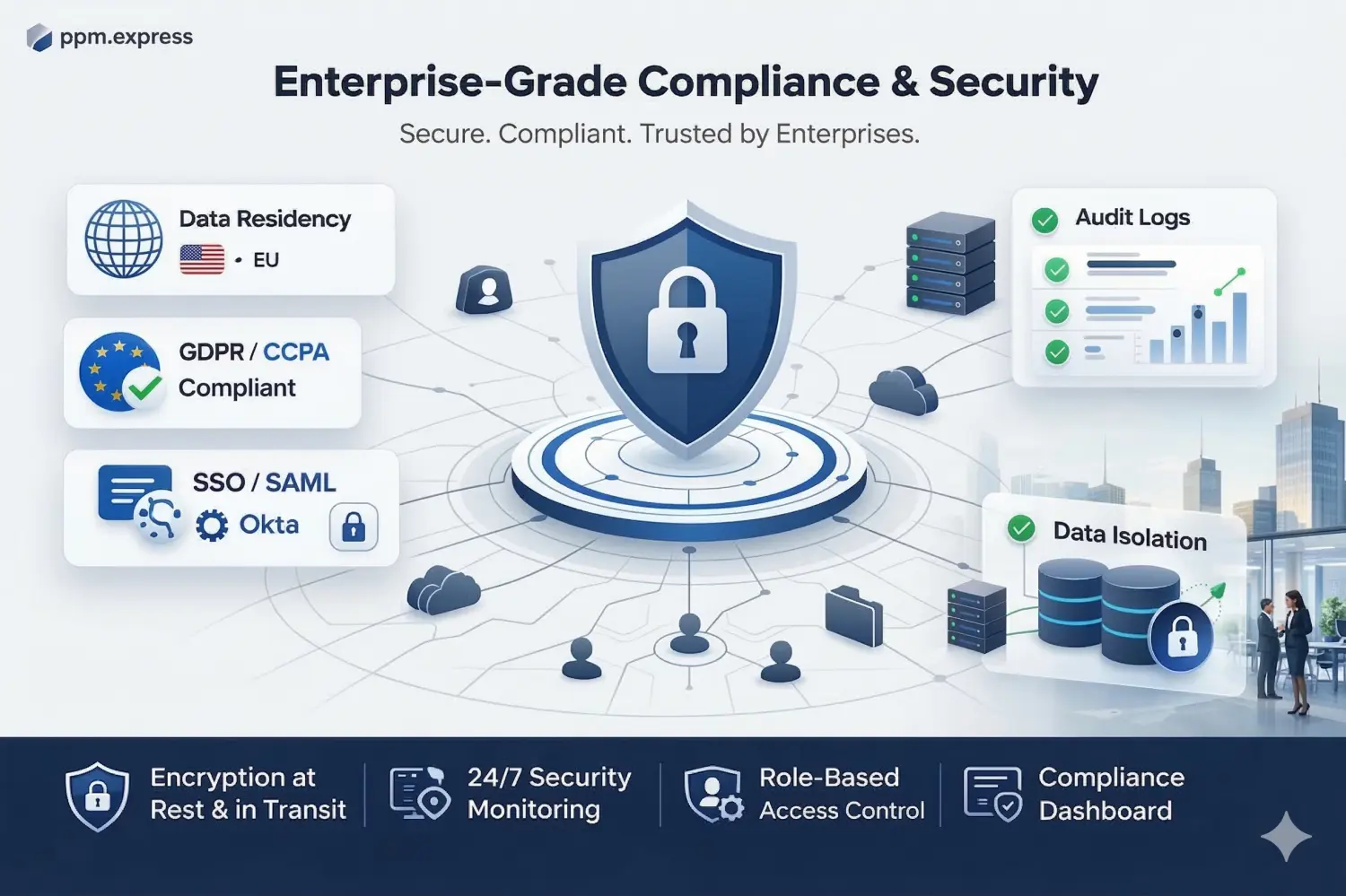
PPM Express reads monday.com work data only — boards, groups and items with their owners, dates and status. No column is added, no automation is touched and no team is asked to restructure a board that already works for them. Identity runs through Microsoft 365 or Okta SSO, so nobody manages another credential.
monday.com boards, groups and items. Connect as many boards as the portfolio needs and leave the rest to the teams.
Your board structure. Nothing is written back, no column is created and no automation is changed by the connection.
Microsoft 365 or Okta SSO, with central user management and granular permissions.

monday.com spreads by design — any team can spin up a board. Choose the ones that represent funded work and leave the rest alone. Connecting takes minutes and changes nothing your teams see.
Map each connected board to an initiative inside a portfolio or program, and attach what a board cannot hold: budget and forecast, benefits, strategic score, risks and issues, and the people who have to deliver it. The teams keep their own columns; the portfolio gets one vocabulary.
Prioritise, fund and sequence in PPM Express, and test the result against the capacity you actually have. Your teams carry on in monday.com and never see the machinery above them.
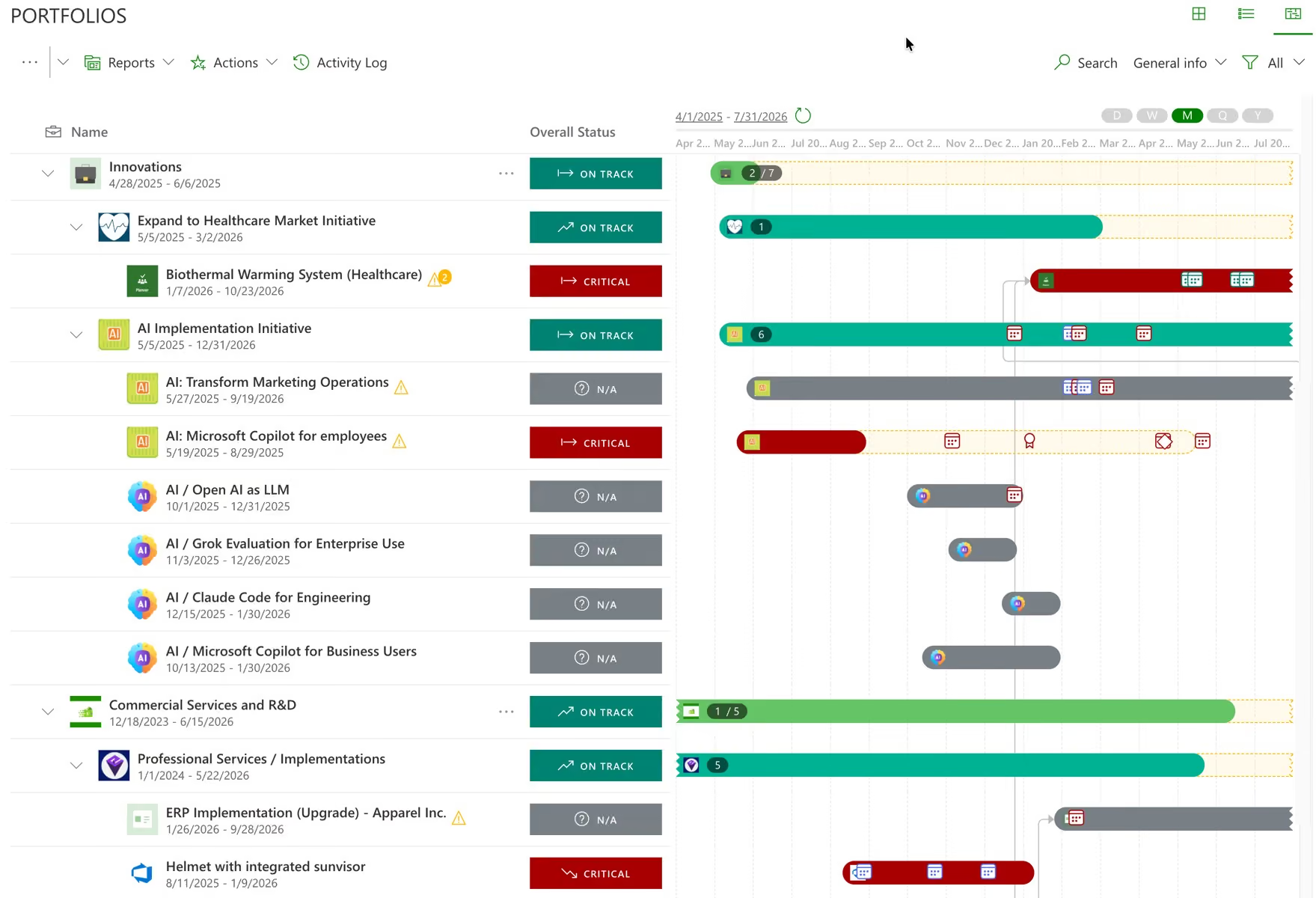
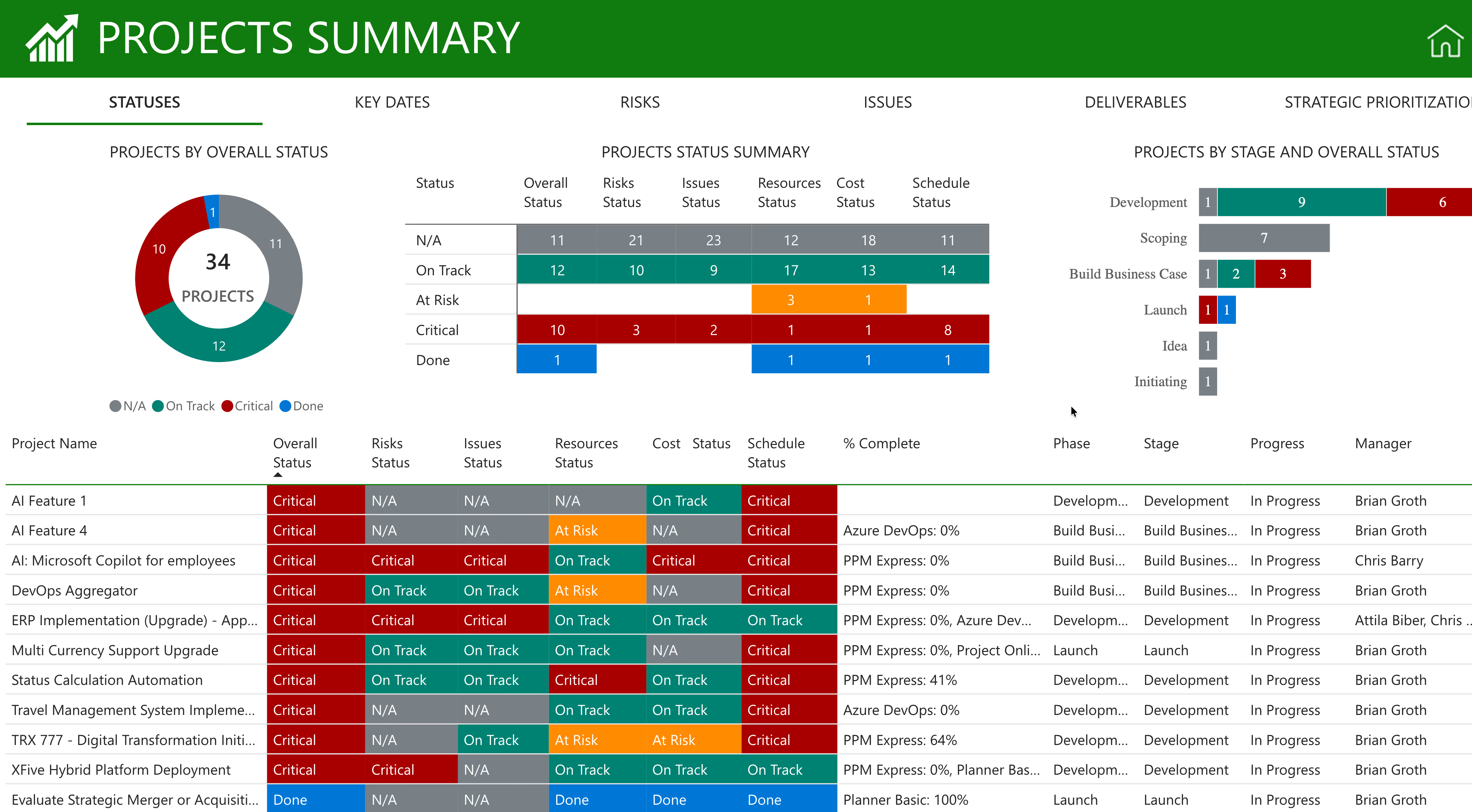
Connected boards become initiatives inside portfolios and programs, described in the same terms whichever team built them. Every initiative carries its status, timeline, budget, capacity and risk in the same row, so a portfolio review reads as one table instead of a tour of everyone else’s workspace.
Portfolios, programs and initiatives above boards that never agreed on a column name.
Status, dates, budget, forecast, benefits, capacity and risk, lined up so initiatives can be compared rather than described.
Read-only access for executives, sponsors and finance partners — without buying each of them a monday.com seat to look at boards they will never edit.
Progress is read from the items your teams are already moving across the board: owner, dates and status. Nobody fills in a status form, and the portfolio cannot drift from monday.com because it is not a copy of it.
The roll-up reflects what the boards say now, not what a summary board said when someone last maintained it.
If dates or completion change after you have built an analysis, PPM Express shows exactly what changed and asks whether to take it, instead of absorbing it silently.
AI-written summaries drawn from live plan data, so project leads stop writing updates about work the system can already see.
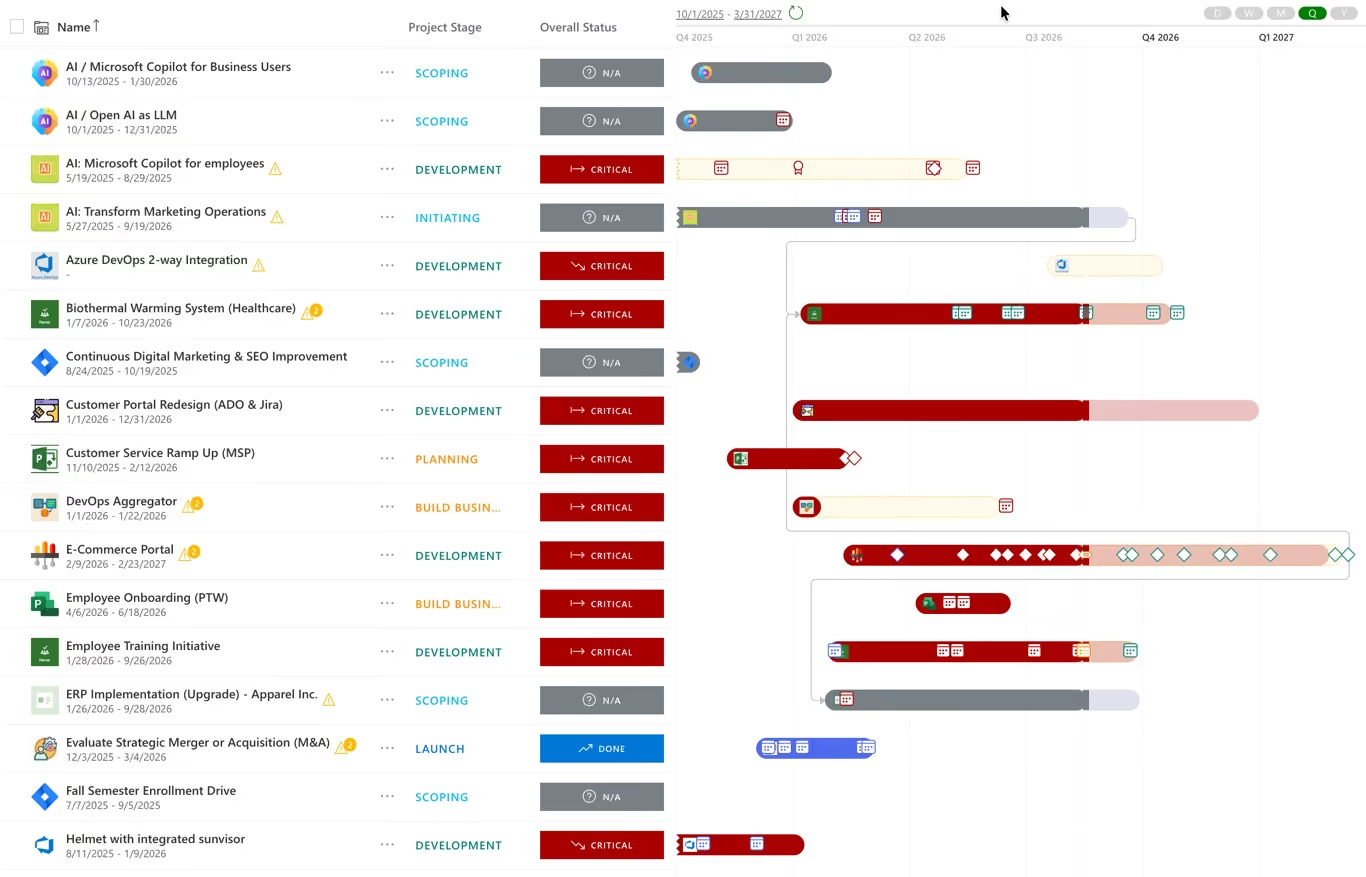
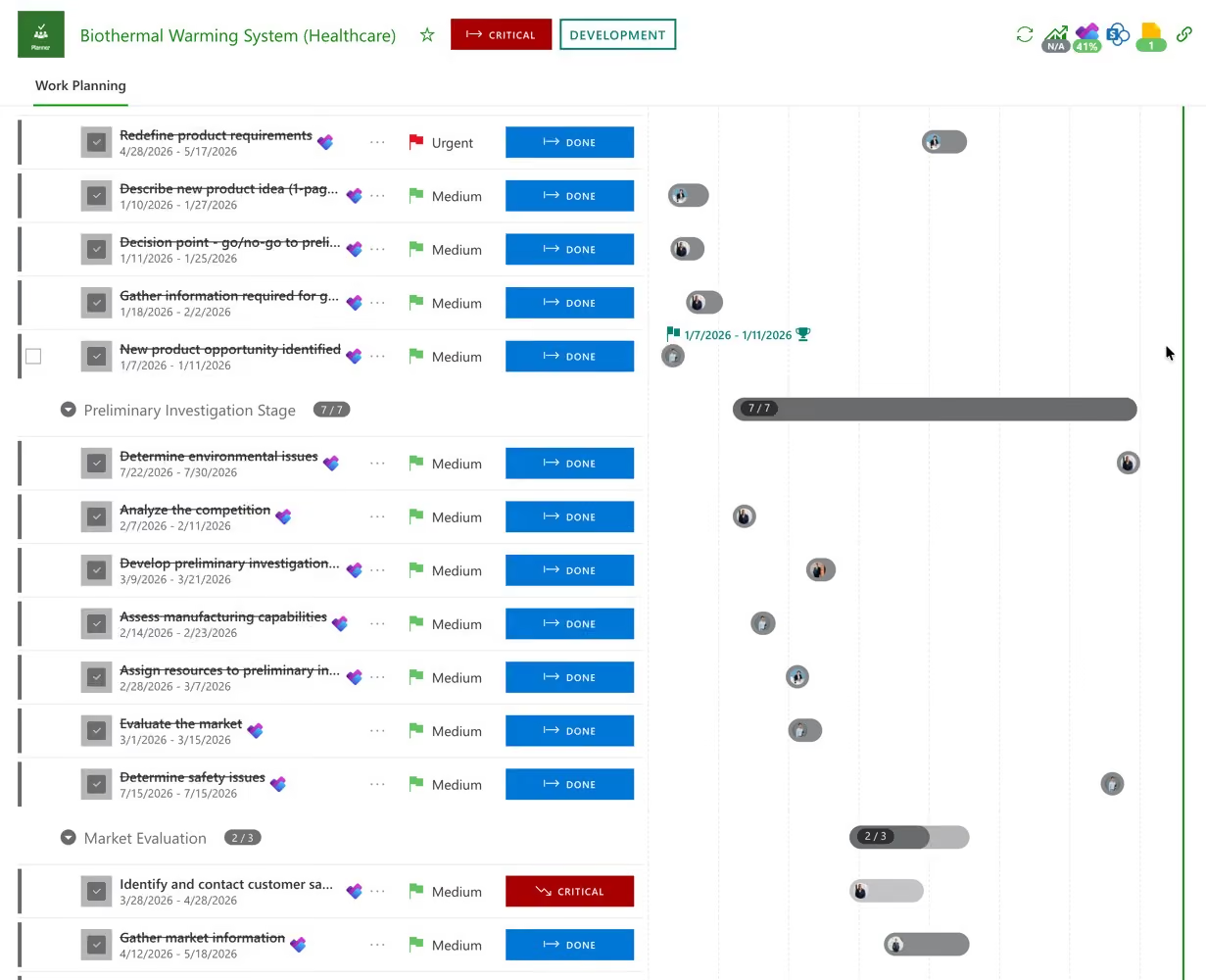
A board has its own timeline view; what it cannot show is the dependency between your board and someone else’s. PPM Express puts every connected board on one Gantt with the dependencies and milestones between them, so the portfolio has a timeline even though each team plans its own way.
Initiatives and items on a single Gantt, with dependencies drawn between work that monday.com keeps in separate workspaces.
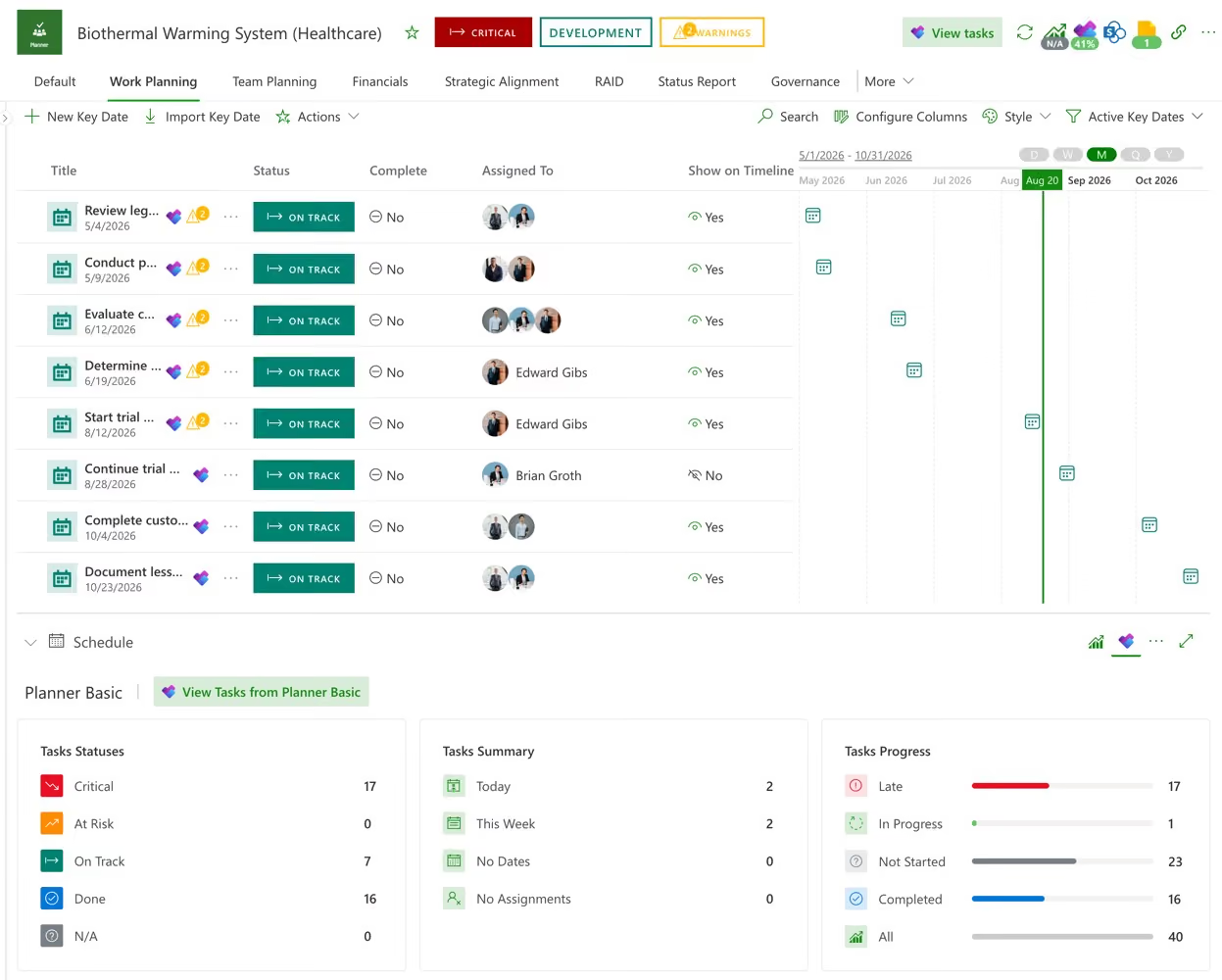
Milestones, owners and due dates in one place, updated once and reflected everywhere.
Built from live plan data, so when the work moves the roadmap moves with it instead of being redrawn.

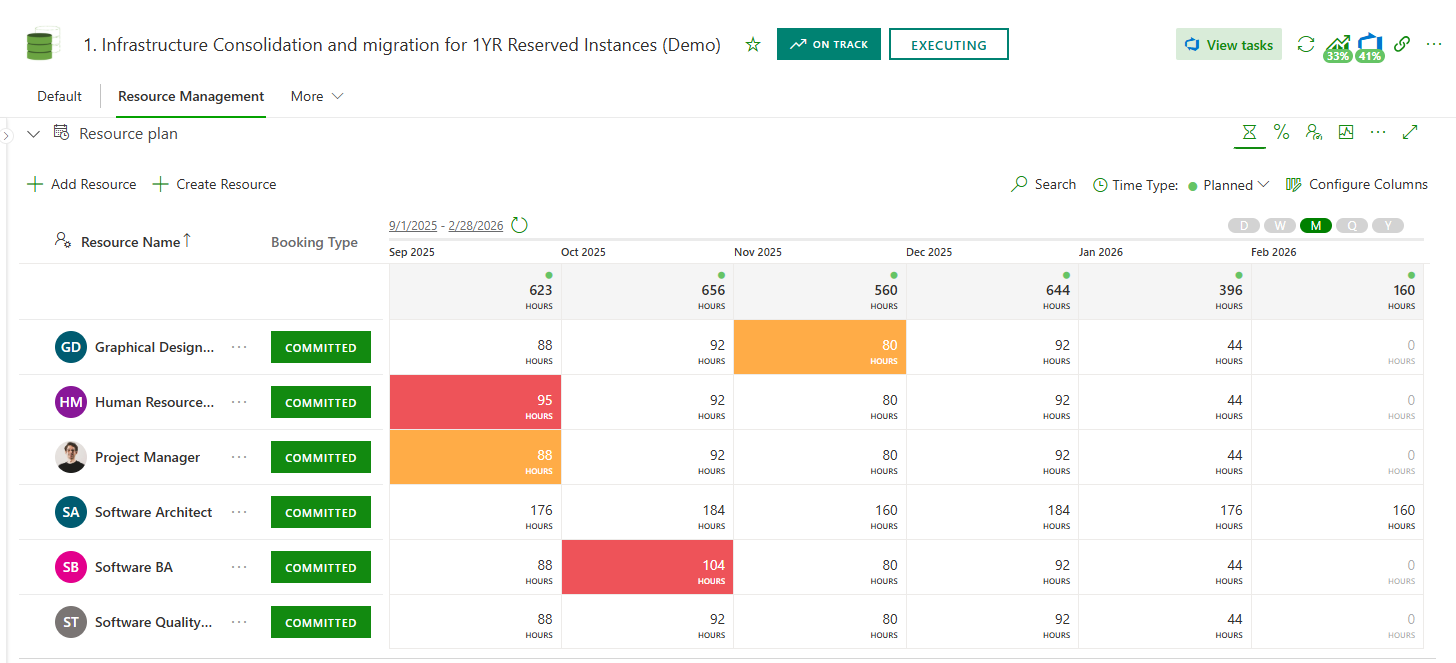
An owner column tells you who is responsible, not whether they are already committed elsewhere. PPM Express adds resource capacity and utilization, budgets and forecasts, benefits, and a risk and issue register on top of the boards you already run — without asking anyone to record any of it twice.
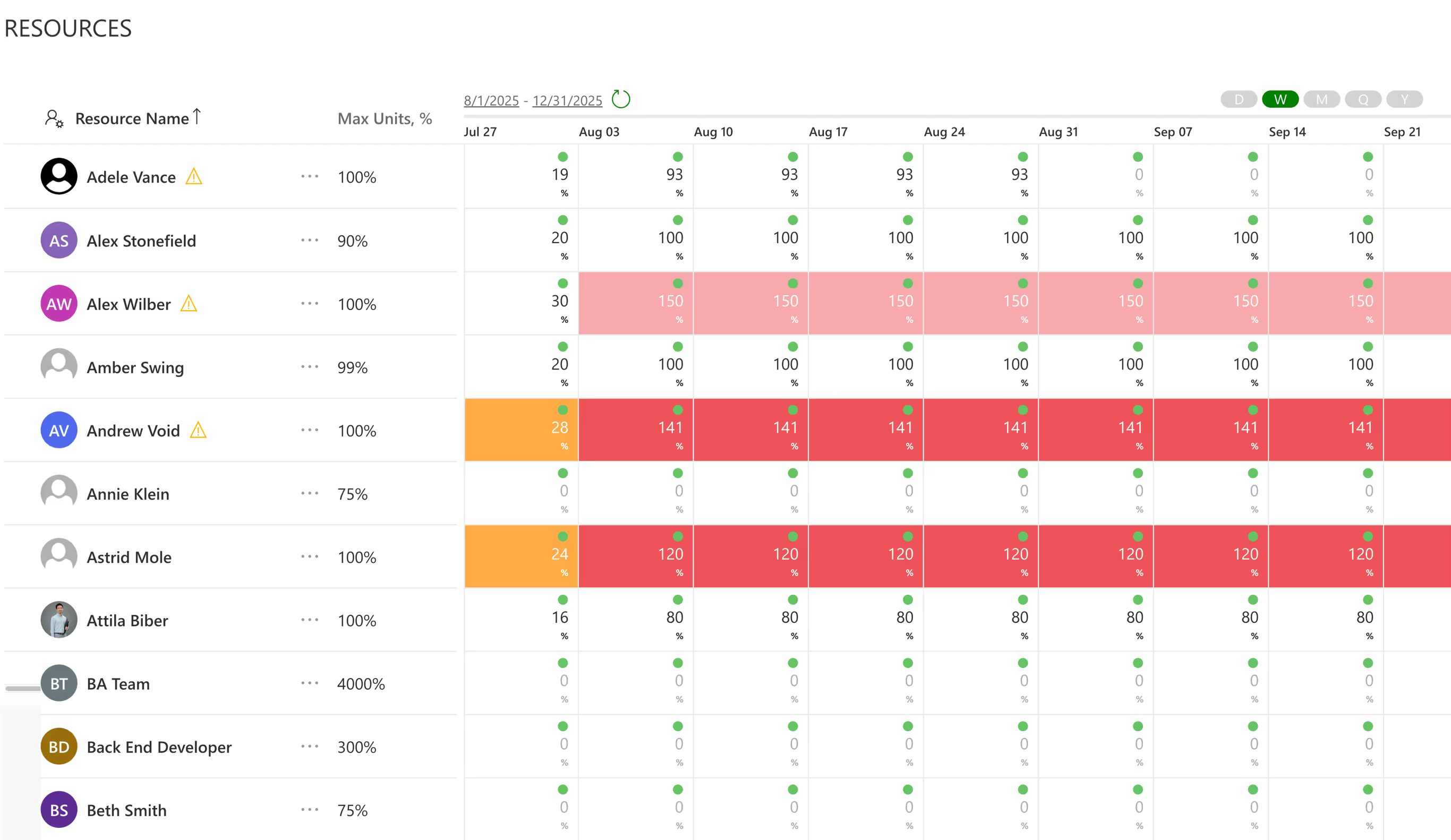
Allocate people to initiatives in hours or percentage FTE, and read the pool as a table or a histogram before anything is committed.
Cost and forecast per initiative, tracked against the benefit it was funded to deliver — the conversation Planner cannot have.
A register per initiative, rolled up to the portfolio, so problems are visible before they are history.
Work managed in monday.com is reported next to everything else the enterprise delivers. Where other teams run Jira, Azure DevOps, Microsoft Project, Planner or Smartsheet, those roll into the same portfolio and the same reports — nobody migrates, and no team is told to abandon the tool that suits it.
Portfolio and project health, risks, issues, costs and capacity, ready to use rather than waiting to be built.
monday.com alongside Jira, Azure DevOps, Microsoft Project, Planner and Smartsheet.
For executives, sponsors and external stakeholders — the same numbers, without a rebuild for each audience.
Adding a portfolio layer usually means replacing the tool people like, or rebuilding every board to a template nobody asked for. This does neither. monday.com keeps running exactly as it does today, PPM Express reads from it, and if a team later moves to Jira, Microsoft Project or anything else on the list, the portfolio does not change — only the connection behind it does.
Boards, groups and items are read into PPM Express and nothing is written back. monday.com stays the single source of truth for the work, and the portfolio layer observes rather than intervenes — which is also the shortest path through a security review.
No new column, no automation to rewire, no template forced on a team that already has one that works. If you disconnect tomorrow, every board is exactly as you left it.
Any team can create a board, so not every board deserves a place in the portfolio. Promote the ones that represent funded initiatives and leave the rest to the teams.
Board data only: boards, groups and items with their owners, dates and status. Nothing is written back to monday.com, and no column or automation is altered by the connection.

Enterprises rarely run on one tool, and they should not have to. PPM Express lets monday.com stay what teams chose it for — fast, flexible work management shaped to each team — while the portfolio above it carries programs, capacity, financials, risk and reporting at enterprise scale.
No migration project, no retraining, no vendor lock-in — and no argument with the teams about giving up a tool that works for them.
Adoption is the hardest part of any PPM rollout. Nobody has to be persuaded to give up a board they designed themselves.
Portfolio and program management, resource capacity, financials, benefits, risks and issues, and reporting leadership can read without a seat or an invitation.
If a team outgrows monday.com and moves to Jira or Microsoft Project, the portfolio stays put. Only the connection behind it changes.
Leadership asks what is in flight and gets thirty different answers, or a summary board somebody maintains by hand.
Availability is guessed, budgets sit in a finance spreadsheet, and risks are remembered rather than recorded.
Every executive who wants to look is another paid seat on a tool they will never edit.
Leadership reads the portfolio directly, and the monthly assembly job disappears.
Availability is calculated, budgets and benefits are tracked per initiative, and risks have an owner and a date.
The only people who need a PPM Express account are the ones asking portfolio questions: the PMO, sponsors, finance partners and leadership. Delivery teams stay on their boards.

Every project, person and dollar in one live view.
Integrations

Capacity from real work weeks, so over-allocation surfaces before you commit.
Product

Test the portfolio against capacity before you commit.
Product
Last updated 20 August 2026
PPM for monday.com, answered.
Only up to a point. monday.com is work management: boards, groups and items shaped by each team. What it does not provide is a comparable level above the boards, resource capacity, budgets and benefits, or a risk register — so it cannot answer what the organization is delivering, what it costs or whether the people exist to deliver it. PPM Express adds that layer while the boards stay in monday.com.
No. Boards keep their own columns, statuses and automations. PPM Express reads the boards you choose to connect and maps each one to an initiative in the portfolio, so comparability is created above the boards rather than imposed on them. If you disconnect later, monday.com is untouched.
One-way. Boards, groups and items are read into PPM Express and nothing is written back to monday.com. Your boards stay the single source of truth for the work, which keeps the connection simple to approve and impossible to disrupt.
The opposite. The portfolio layer is deliberately separate from the tool the work sits in, so different teams can use different tools and a team that outgrows Planner can move to Jira, Azure DevOps, Microsoft Project, Smartsheet or Monday.com without the portfolio being rebuilt. Only the connection behind it changes.
No. People who only read — executives, sponsors, finance partners — work in PPM Express, not in monday.com. That matters at scale: a portfolio audience is usually far larger than the delivery teams, and paying per seat for read-only access to boards is how a work management bill turns into a portfolio-sized one.
Board data only: boards, groups and items with their owners, dates and status. Nothing is written back, no column is created and no automation is changed. Identity runs through Microsoft 365 or Okta SSO.
That is the normal case, and it is a common reason enterprises adopt PPM Express. monday.com, Jira, Azure DevOps, Microsoft Project, Planner and Smartsheet are all supported connections and roll into one portfolio. No group of teams migrates, and nobody maintains a sync layer between tools purely to produce a leadership report.
No. The people doing the work stay on their boards and never open PPM Express. Accounts are for the people asking portfolio questions: the PMO, sponsors, finance partners and leadership. A portfolio tool that makes delivery teams maintain a second set of records is a portfolio tool holding stale data by the end of the quarter.
You decide which boards are promoted into the portfolio. Boards a team runs for its own week stay where they are; the ones that represent funded initiatives are connected and given an owner, a budget and a place in a program. Board sprawl stays in monday.com, where it does no harm.
Yes. PPM Express is used by enterprises running hundreds of initiatives across multiple portfolios, with delivery spread across monday.com and other tools. Leadership works from live progress, capacity, cost and risk, with reporting automated across every portfolio rather than assembled for each review.
Because the summary was built by hand at a point in time and the boards moved afterward. Reading the portfolio live from monday.com removes the gap. When dates or status change upstream after you have built an analysis, PPM Express shows you exactly what moved and asks whether to take it, rather than absorbing the change silently.
Boards in one division, sheets in another — both roll into the same portfolio. Smartsheet portfolio management
Plans in Microsoft 365, covered by the same portfolio layer. Microsoft Planner portfolio management
Capacity across every board and every plan, calculated in one place. Resource capacity planning and utilization
Every system PPM Express connects to, and what each connection reads. All PPM Express integrations
Hosting, identity, permissions, and the data PPM Express never touches. Security and trust




.svg)


